Free Keyword Research Tools That Actually Help You Rank
By OnPageSEO.ai Team

Most guides on free keyword research tools hand you a list of names and call it a day. We are doing something different. Instead of telling you which tools exist, we will show you how to use them in the right sequence so the time you put into research actually translates into rankings.
Most small businesses do not fail at keyword research because they lack tools. They fail because they use the right tools in the wrong order.
According to Ahrefs, 96.55% of all pages get zero organic traffic from Google, and one of the leading causes is targeting keywords that are either too competitive or misaligned with search intent. Meanwhile, Backlinko reports that the first organic result earns an average click-through rate of 27.6%, dropping to under 3% by position 10. The gap between ranking and not ranking is enormous, which makes choosing the right keywords one of the highest-leverage decisions in SEO.
Why Free Tools Are Enough to Start
Paid tools offer volume data, trend signals, and competitive intelligence that free tools cannot fully replicate. Most small business owners do not need all of that. They need enough signal to identify winnable targets and enough structure to act on them.
Free keyword research tools cover that ground well. The issue is not capability. It is coordination. Using five tools without a system produces noise, not insight.
There is also a pace argument worth making. Most small businesses publish fewer than four articles a month. At that rate, free tools provide enough data to build a year's worth of content before you hit any meaningful limit. The businesses that feel they need paid tools often need them for volume, not because the underlying keyword data is better. If you are not yet publishing consistently, upgrading your tools will not fix the problem.
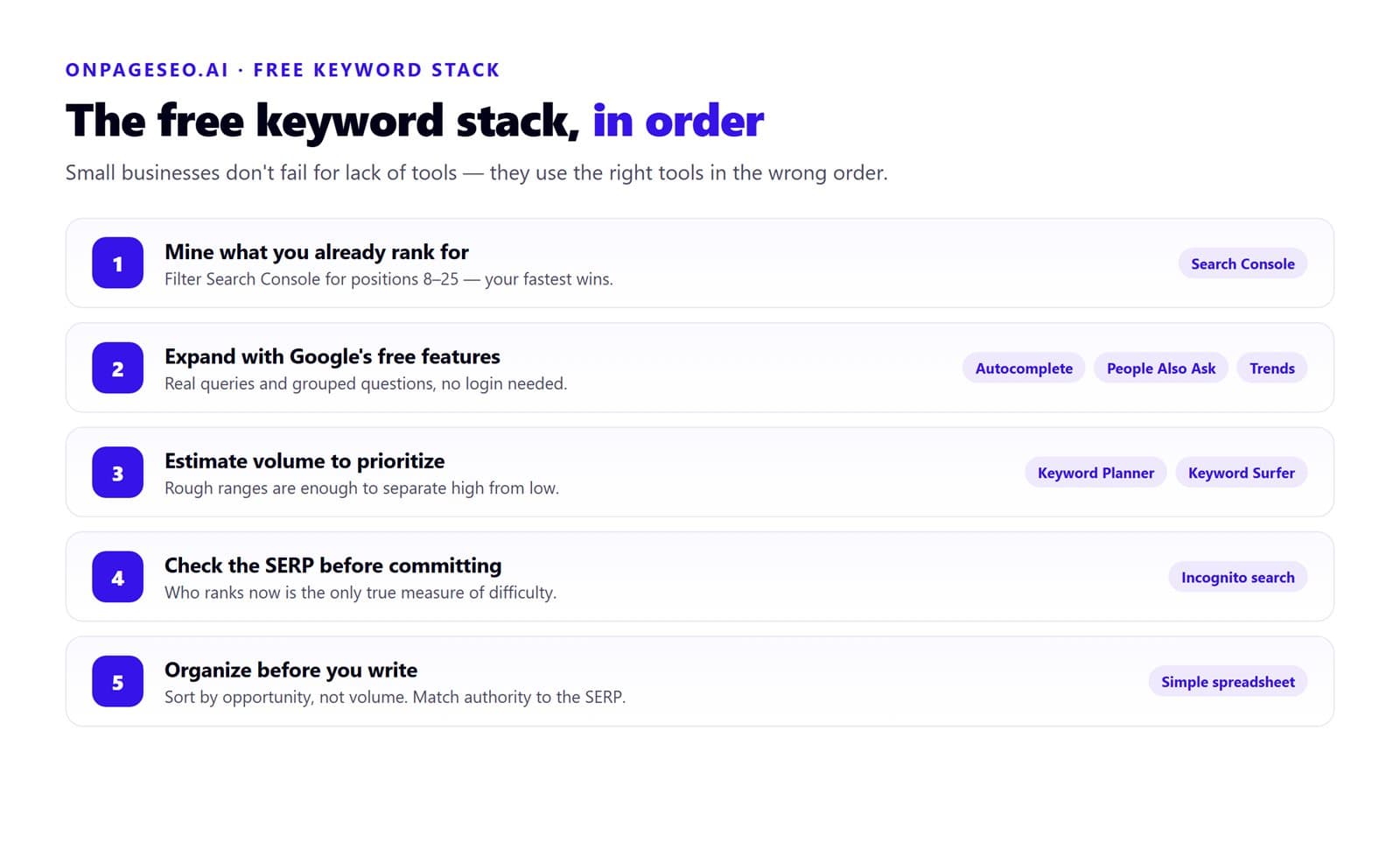
The Free Keyword Research Stack, in Order
Step 1: Start with Google Search Console
Before researching new keywords, look at what you already rank for. Google Search Console shows every query your site has appeared for in the past 16 months, along with impressions, clicks, position, and click-through rate. One important caveat: if your site is brand new and has not yet earned meaningful search visibility, skip to Step 2 and return to this step once Google has indexed enough pages to generate data.
Filter for queries where your average position sits between 8 and 25. These are your fastest wins. Google already considers your content relevant enough to surface it. A targeted on-page improvement is often all it takes to move those pages into the top five. For a closer look at how to prioritize these, read our breakdown of keyword difficulty and what the numbers actually mean.
One insight that rarely shows up in standard keyword guides: ignore keywords where your CTR is already strong. Instead, focus on queries with high impressions but below-average CTR. That gap usually means your title and meta description are underselling the page. Fixing those two elements often produces faster ranking gains than writing an entirely new article, because the page already has Google's trust.
Step 2: Expand with Google's Own Free Features
Google gives away more keyword data than most people use.
- Google Autocomplete shows real queries typed by real users. Type your seed keyword and note the suggestions. These are high-intent, real-world variations.
- People Also Ask surfaces related questions Google has already grouped around a topic. Each box is a potential subheading or standalone article.
- Related searches at the bottom of the SERP reveals lateral terms that share the same audience.
- Google Trends shows seasonal demand and compares two keywords head-to-head. It will not give you volume numbers, but it shows direction.
None of these require a login or a credit card. Together, they give you a map of how Google actually groups your topic.
Step 3: Use a Free Tool for Volume Estimates
Once you have a list of candidates, you need rough volume estimates to prioritize. Google Keyword Planner is the most reliable free source, though it requires an active Google Ads account. Ranges are broad but sufficient to separate high-volume from low-volume terms.
Keyword Surfer (a free Chrome extension) shows volume estimates directly inside Google search results without leaving the page. AnswerThePublic is useful for surfacing question-format keywords that map to featured snippet opportunities, though the free plan limits daily searches.
Step 4: Check the SERP Before Committing
Volume and keyword difficulty scores are proxies. The only true measure of how competitive a keyword is comes from looking at who currently ranks for it. Before targeting any keyword, open an incognito browser window and search for it.
Ask yourself:
- Are the top results from major national brands, or from sites similar in size and authority to yours?
- Is the content on page one thin, outdated, or poorly structured?
- Are there forums, Reddit threads, or Quora answers ranking? That signals weak competition.
- Does the SERP show mostly informational content, or mostly product and service pages?
That last question matters a great deal. If you search "best standing desk" and Google returns ecommerce category pages across the top five results, writing a blog post with that title is unlikely to rank. Google has already determined that users want to browse and buy, not read. No amount of content quality overrides an intent mismatch.
There is a second pattern worth looking for. If the top five results all have the primary keyword in the URL, the title tag, the H1, and the opening paragraph, that is a strong signal Google expects heavy topical relevance for this term. It means you cannot take shortcuts on placement. Every one of those on-page signals needs to be present in your page as well. This is also where getting your onsite optimization right before building backlinks becomes relevant. A page that matches intent but has weak technical signals will underperform even in low-competition results.
Step 5: Organize Your Findings Before Writing
Free keyword research tools generate ideas faster than most teams can use them. The bottleneck is not discovery. It is prioritization.
Build a simple spreadsheet with the keyword, estimated volume, your current position (if any), the top-ranking domain type, and an intent note. Sort by opportunity, not alphabetically. Target the keyword where your existing authority is closest to what the SERP requires, not the one with the highest volume.
What Free Tools Cannot Do
Free keyword research tools do not show precise backlink profiles, exact volume figures, or keyword clustering at scale. Those gaps become real constraints when you are managing dozens of pages or multiple clients. For most small businesses publishing under four articles a month, the free stack is enough to sustain a full content calendar.
Applying What You Find: From Keyword to Content
Researching keywords is only half the job. The other half is placing them correctly within your content.
Distribute your primary keyword across the title, the first 100 words, at least one subheading, and several natural instances in the body. Secondary keywords should appear where they fit without forcing. Even distribution tells Google the entire page is about the topic, not just one paragraph.
How OnPageSEO.ai Connects to Keyword Research
Keyword research tells you which terms to target. On-page optimization determines whether the page you build around those terms can actually rank. Once you have your target keyword from the free stack above, OnPageSEO.ai audits the page against it in one click, closing the gap between finding a keyword and actually executing on it.
| What OnPageSEO.ai checks | Why it matters for keyword research |
|---|---|
| Keyword distribution across title, H1, subheadings, and body | Shows whether your primary keyword is spread evenly or clustered in one section |
| Missing secondary keywords | Surfaces topical gaps that weaken relevance signals |
| Title tag and meta description quality | Directly addresses the high-impression, low-CTR pattern identified in Step 1 |
| Header hierarchy (H1 to H6) | Confirms your page structure matches what top-ranking pages use for this keyword |
| Internal link structure | Ensures onsite optimization signals support the keyword you are targeting |
| Image alt text | Covers on-page signals that free keyword tools do not check at all |
For small business owners deciding between DIY and professional content optimization, OnPageSEO.ai sits in the middle: it gives you audit-level insight without the agency retainer. Research without implementation is just a spreadsheet. The extension makes sure your page earns what the keyword research promised.
FAQ
What is the best free keyword research tool for beginners?
Google Search Console for sites with existing content. For new sites, Google Keyword Planner combined with Autocomplete and People Also Ask covers the essentials at no cost.
Can I do keyword research without a paid SEO tool?
Yes. Search Console, Keyword Planner, Autocomplete, People Also Ask, and free extensions like Keyword Surfer cover the core workflow. Limitations appear at scale, not at four articles a month.
How many keywords should I target per page?
One primary keyword and two to four closely related secondary terms. If keywords reflect meaningfully different intent, serve them with separate pages.
Are free keyword research tools accurate enough for SEO?
Accurate enough, yes. Free tools provide volume ranges rather than exact numbers. Use them to identify direction and eliminate unwinnable targets, not to make precise forecasts.
Final Thoughts on Free Keyword Research Tools
Free keyword research tools give you everything you need to find winnable targets, understand intent, and prioritize your content calendar. The tools themselves are not the bottleneck. Using them in sequence, checking the live SERP before committing, and distributing keywords properly in your content are the steps that separate rankings from wasted effort.
Start with your Search Console data, expand with Google's free features, estimate volume, and check the competition before you write a single word. Once you have your target keyword, use OnPageSEO.ai to audit your page in real time and ensure your on-page signals are fully optimized. Sign up and install the Chrome extension to check keyword usage, header structure, metadata, and more on any page in one click, completely free to start.