Boost Your Rankings: On Page SEO for WordPress Secrets
By OnPageSEO.ai Team
If you've been managing a WordPress site for any amount of time, you already know the drill. You install an SEO plugin, optimize a few fields, and assume your page is ready to rank. But modern on page SEO for WordPress requires more than checking boxes. Search engines evaluate content quality, relevance, page structure, and user engagement, making it harder to compete with a basic plugin-only approach.
The numbers tell the story:
- Ahrefs found that 96.55% of web pages receive no organic traffic from Google.
- Around 46% of Google Search Console clicks come from long-tail queries that many SEO workflows fail to track.
That's why a smarter, data-driven approach matters.
Why Traditional WordPress SEO Plugins Fall Short
Most WordPress on page SEO tools were built around the same idea: score your content against a keyword and tell you whether your title, meta description, and headings check out. That was useful in 2015. Today, it's not enough.
Here's where most standard plugins hit a wall:
- They analyze a static draft in your WordPress editor, not the actual live page Google crawls. Rendered pages can look very different once JavaScript, theme scripts, and third-party widgets load, and those differences matter to how Google interprets your content.
- They don't pull real search performance data. You're making decisions without knowing your actual impressions, clicks, or ranking positions for that page. You're essentially flying blind.
- They're plugin-heavy. Many add significant bloat to your WordPress installation, which can slow your site down, and slow sites rank worse. Every extra plugin is also a potential compatibility issue, a security surface, and a maintenance burden.
- They give you a checklist, not context. Telling you to "add your keyword to the meta description" is not the same as telling you what's working for pages that already rank. Context without competitive framing is just noise.
The reality is that on page SEO in WordPress has become more competitive and more nuanced. Green lights on a plugin scorecard don't equal rankings, and the gap between sites that rank and sites that stall is increasingly about the quality and depth of the optimization process, not just whether a box got checked.
A Better Way to Handle On Page SEO WordPress Work
This is where the approach shifts. Instead of editing in a WordPress backend and guessing at the output, what if you could analyze your live published page, the same version Google sees, directly in your browser?
That's the core idea behind OnPageSEO.ai. It's a lightweight Chrome extension that works on any live webpage, including your WordPress site, without requiring you to install anything into WordPress itself. No plugin conflicts, no added load time, no compatibility issues with your theme.
You install it once in Chrome, navigate to any of your published pages, and click the extension. That's it.
What OnPageSEO.ai Actually Does
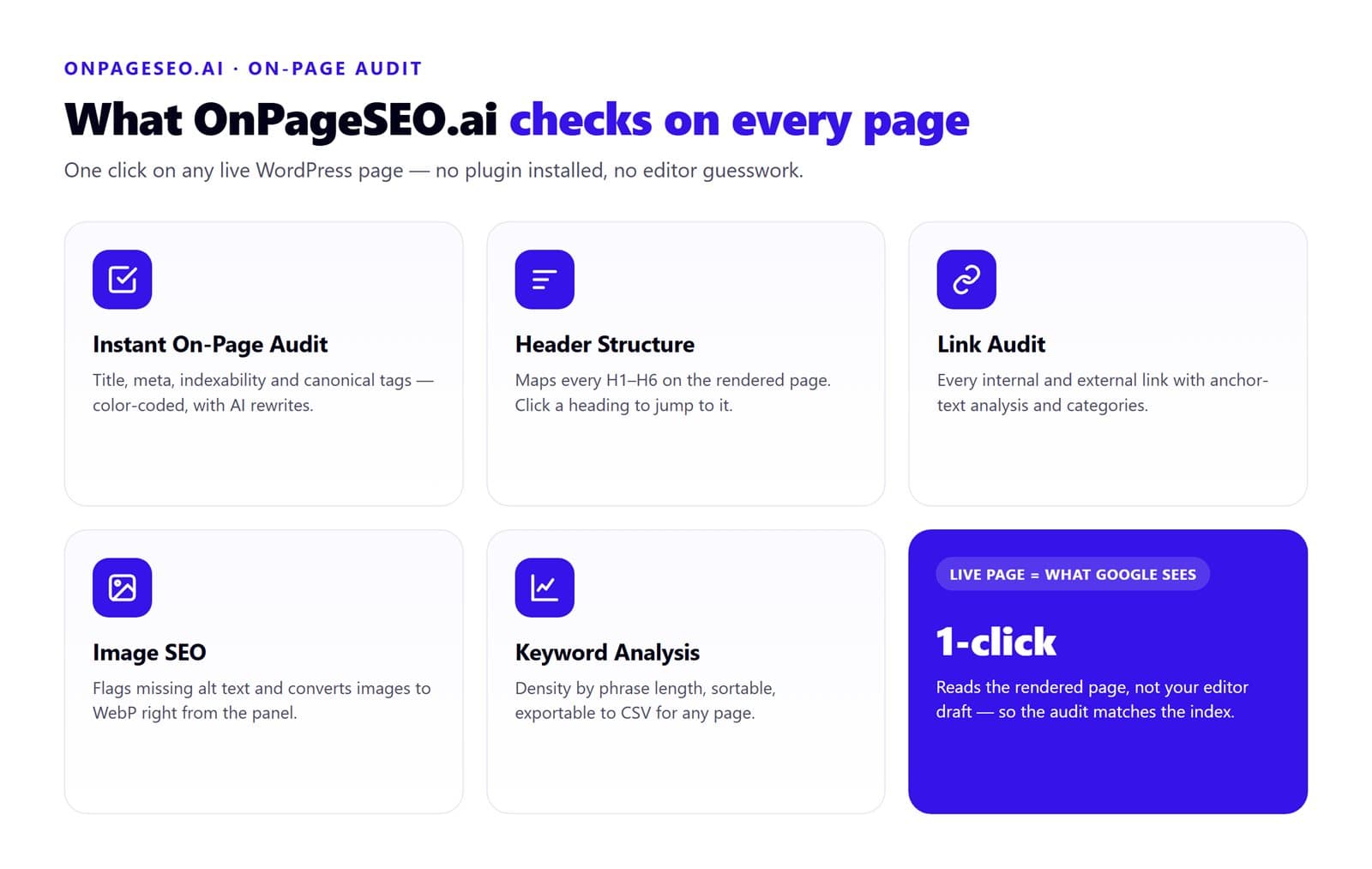
Let's get specific, because this is where it matters.
Instant On-Page Audit
The extension runs a full on page SEO health check the moment you open it on a page. It checks your title tag and meta description, flags indexability issues, verifies canonical tags, and gives you color-coded recommendations. The AI can also generate title and meta description options for you by reading the actual content on the page, not a draft version.
Header Structure Audit
One area where a lot of WordPress sites quietly bleed rankings is heading structure. Poorly nested H tags, missing H1s, multiple H1s on one page. The extension maps out every H1 through H6 on the live page and lets you click any heading in the audit panel to jump directly to that spot on the page. No manual scrolling, no guessing.
Link Audit
Every internal and external link on the page gets surfaced with anchor text analysis and color-coded categorization. This is useful both for identifying broken link opportunities and for spotting over-optimized anchor text patterns that could be flagging signals in Google's algorithm.
Image SEO Audit
Images are one of the most commonly neglected parts of seo on page wordpress optimization. The extension checks every image on the page for alt text, pulls the image URLs, and lets you convert images to WebP format directly from the panel. Considering that image file weight is a major contributor to page speed issues, this alone saves a lot of back-and-forth.
Keyword Analysis
The keyword tab tracks how terms are distributed across the page, shows density percentages, and lets you filter by phrase length. You can sort by count or density, and export the data to CSV. This is practical for auditing pages that may have thin keyword coverage or, on the other side, pages that are accidentally over-optimized.
The Feature That Changes the Game: GSC Integration
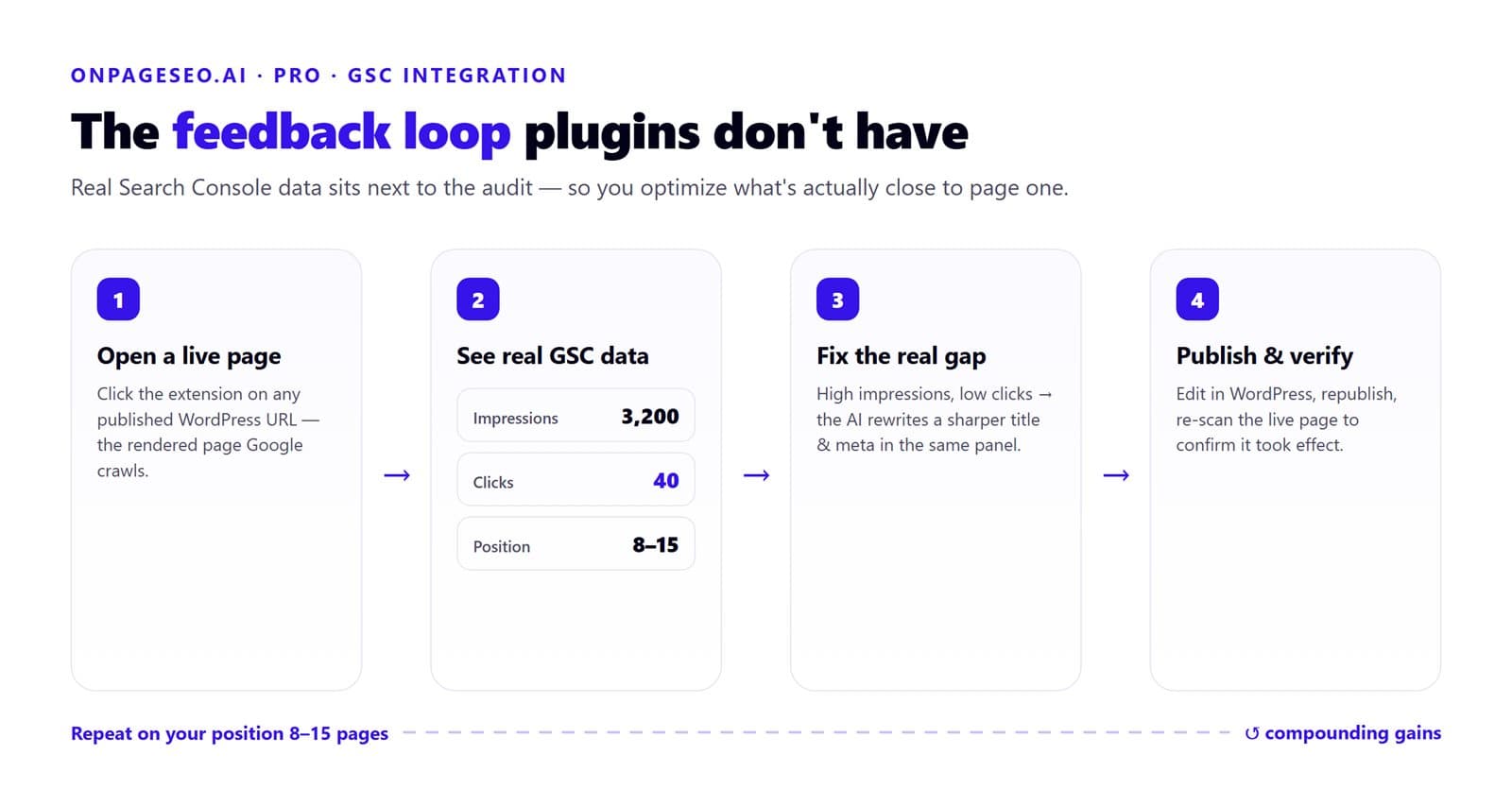
For the Pro plan users, the Google Search Console integration is the standout feature. When you open the extension on any of your pages, you're not just seeing technical audit data. You're seeing that page's actual performance data from GSC, including impressions, clicks, and ranking positions.
The OnPageSEO.ai pricing page breaks down what's included at each tier, and the Pro plan starts at $4.99 per month with a 7-day free trial.
What makes this useful in practice is the combination. You can see that a page is getting 3,200 impressions but only 40 clicks, which tells you the page is surfacing in results but the title or meta description isn't compelling enough to earn the click. You can also spot pages sitting in positions 8 through 15 that are on the edge of page one. Those are your best optimization targets because they already have some authority; they just need a better on-page setup to break through.
You can then use the AI generator right there in the same panel to write a better title, compare options, and know what you're optimizing before you go back into WordPress to make the edit. That's a feedback loop that most on page seo wordpress workflows simply don't have.
How to Use OnPageSEO.ai on Your WordPress Site
The workflow is straightforward:
- Install the extension from the Chrome Web Store via OnPageSEO.ai.
- Publish or navigate to a live page on your WordPress site.
- Click the extension icon in your browser toolbar.
- Work through each audit tab: title, headers, links, images, and keywords.
- For Pro users, check GSC data for that specific page before deciding where to focus your edits. If impressions are high but clicks are low, the title and meta are the priority. If the page barely surfaces, the content depth and keyword coverage tabs will tell you more.
- Make your changes in WordPress, republish, and come back to the live page to verify that the edits actually took effect on the rendered version.
One thing worth calling out: this workflow works whether you're using the block editor, the classic editor, or a page builder like Elementor or Divi. Because the extension reads the live rendered output rather than your editor state, it doesn't matter which tool you used to build the page. That makes it genuinely useful for agencies and freelancers managing WordPress sites with inconsistent setups across clients.
Because the extension analyzes the rendered live page rather than your editor draft, what you see in the audit is exactly what Googlebot sees. There's no gap between what you're optimizing and what's actually indexed.
Who This Is For
If you run a single WordPress blog and you're happy with how your current plugin handles the basics, that's fine. The free tier of OnPageSEO.ai still gives you a solid audit layer that works on top of your existing setup without touching WordPress at all.
But if you manage multiple WordPress sites, work as a freelance SEO, or you're trying to push competitive content into the top positions on pages that matter, the Pro plan's GSC integration and unlimited AI generation are worth the investment. At under five dollars a month, it's a low-risk way to find out whether your current wordpress on page seo process has gaps you didn't know about.
FAQs
How to do on-page SEO in WordPress?
Start by optimizing your title tag, meta description, headings, images, internal links, and content. You should also monitor search performance data and regularly update pages based on user intent and keyword opportunities.
Can we do SEO on a WordPress website?
Yes. WordPress is one of the most SEO-friendly content management systems available. With the right content, site structure, and optimization tools, WordPress websites can rank very well in search results.
Is SEO dead or evolving in 2026?
SEO is evolving, not dying. Search engines now focus more on user intent, content quality, topical relevance, and user experience, making data-driven optimization more important than ever.
Final Thoughts on On Page SEO for WordPress
The standard plugin-plus-checklist approach to on page SEO for WordPress still has a place, but it's not the whole picture anymore. The sites ranking at the top of competitive queries are making data-informed decisions, looking at real search performance, analyzing what's actually on the page Google crawls, and iterating based on that.
OnPageSEO.ai gives you that layer without adding complexity to your WordPress setup. It runs in Chrome, works on any live page, and connects directly to your actual search data. If you've been doing on page SEO the manual way and wondering why results feel slow, this is probably one of the faster ways to find out why.